
Grid system
A framework for possibility.
Seven building blocks
Input frame, impact point, output frame, headline, body copy, keyline and contact. The impact point is always primary yellow.
Landscape and square
The input frame is a square with a side equal to 25% of the canvas height. The impact-point square is one ninth of the input-frame square, as illustrated in the manual.
Portrait
The input-frame side is 23.55% of the canvas height. Align the grid with the side that holds the input frame.
The output frame
Anchor it behind the impact point, with two opposite sides at a 45-degree angle. Align content to the grid and keep a clear cell at the bottom.
Explore the original manual 5 pages · May 2022
Original chapter pages, including all diagrams and examples. PDF page numbers are used below; printed page numbers differ after the first chapter. Historic application examples retain their original wording.
Read page text
H SA G RO U P B R A N D A N D ST Y L E G U I D E                                                                                                                                                                                                                                                                                                                                   5 2

9    Grid
     System
Read page text
H SA G RO U P B R A N D A N D ST Y L E G U I D E                                                                                                                                                                                                                                                                                                                                   5 3

GRID SYSTEM

Layout anatomy

 1  INPUT FRAME
    Within the impact frame should be
   an image or graphic that shows
   what HSA has done or will do in the
    context of the story being told. It
   can be of an employee, a product or
    another significant image that clearly
                                              3    represents the subject matter.

 2  IMPACT POINT
   Always coloured in our primary
    yellow, this highlights the role of HSA
     in any communication to the viewer.
   Wherever we see this, we know                                              2      it is a HSA story.

 3  OUTPUT FRAME
   The outcome of activating the ‘input’
   and how it can drive change for
    business and communities.

 4  HEADLINE
   The headline must sit on the baseline
    of the impact point and the font size
   must not exceed the height of the cell.                                                                  4
    Font size is allowed to scale down
    within the cell and is governed by
   amount of content.
                                                                                                                       5
 5  BODY COPY                                                                            1
    Detailed information and
    call to action.

 6  KEYLINE                                                              6     Sits half cell above URL.
                                                                 7
 7  CONTACT
   Website URL address.
Read page text
H SA G RO U P B R A N D A N D ST Y L E G U I D E                                                                                                                                                                                                                                                                                                                                   5 4

GRID SYSTEM

Grid system
landscape

The grid system is based around the
impact point square which is housed
within the input frame.
                                                                                                    AXIS
With a landscape format, the input        Y
frame is 25% of the height of the Y axis
squared, with the impact point being 1/9
of the input frame squared.

The size of the impact point square
(WxH) is used to make the grid. Once the
grid is established, the input frame and
impact point can be located on either
side of the canvas, with the impact point               Input frame 25% scale squared of Y axis.                   Impact point 1/9 of input frame squared.                   The grid is made using impact point square dimensions.
always being sat on the most central
inside corner of the input frame.

With the grid set, it allows for other
assets to be added to the layout.
Every part of the design must snap to
the grid. The height of where the input
frame is placed on the Y axis depends
upon the amount of content required.

Note:
Not all formats will allow for the grid
to fit both X and Y axis equally. In this
case the Y axis is the datum point as
the input and impact frames must
be square.

Headline copy shown at maximum size.
See example visuals.                              Output frame is always anchored behind the impact point.     Content governs the height for all assets. One cell from the
                                          Two opposite sides of the output frame must be at a 45        bottom, should be left clear before the edge of the canvas.
                                               degree angle to the grid.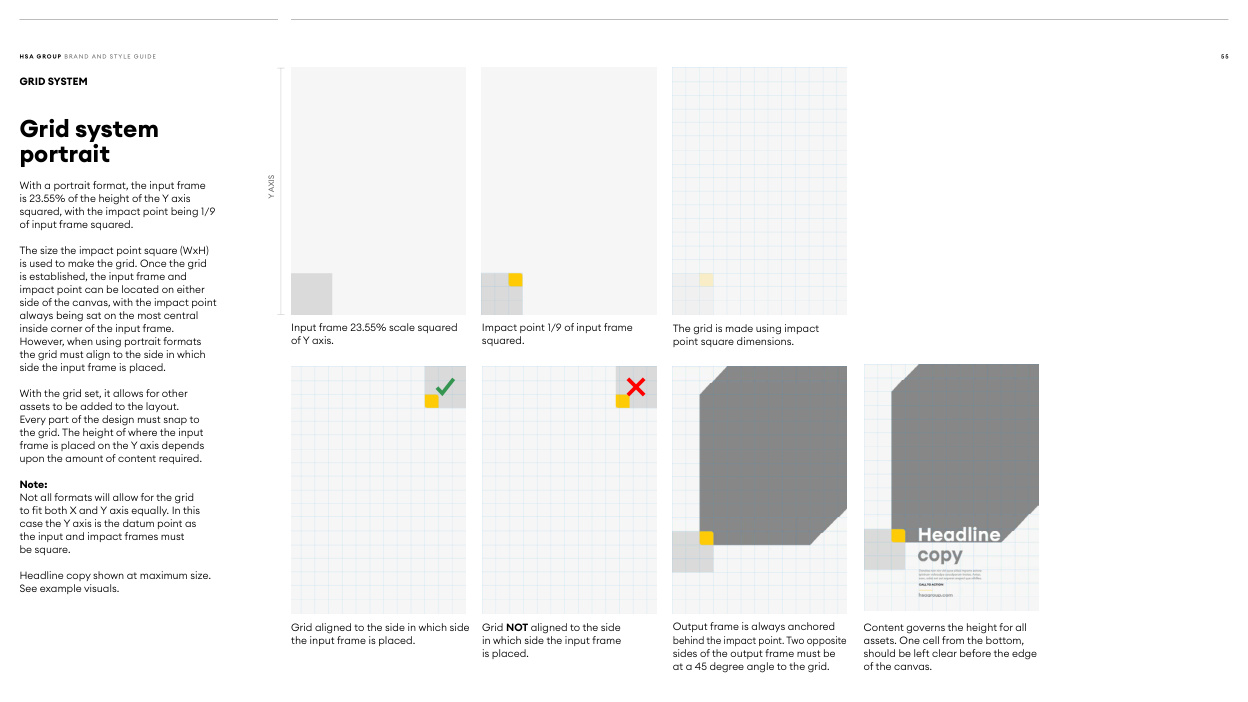
Read page text
H SA G RO U P B R A N D A N D ST Y L E G U I D E                                                                                                                                                                                                                                                                                                                                   5 5

GRID SYSTEM

Grid system
portrait
With a portrait format, the input frame                        AXIS
                         Yis 23.55% of the height of the Y axis
squared, with the impact point being 1/9
of input frame squared.

The size the impact point square (WxH)
is used to make the grid. Once the grid
is established, the input frame and
impact point can be located on either
side of the canvas, with the impact point
always being sat on the most central
inside corner of the input frame.                       Input frame 23.55% scale squared    Impact point 1/9 of input frame       The grid is made using impact
However, when using portrait formats                  of Y axis.                            squared.                             point square dimensions.
the grid must align to the side in which
side the input frame is placed.

With the grid set, it allows for other
assets to be added to the layout.
Every part of the design must snap to
the grid. The height of where the input
frame is placed on the Y axis depends
upon the amount of content required.

Note:
Not all formats will allow for the grid
to fit both X and Y axis equally. In this
case the Y axis is the datum point as
the input and impact frames must
be square.

Headline copy shown at maximum size.
See example visuals.


                                                   Grid aligned to the side in which side  Grid NOT aligned to the side         Output frame is always anchored     Content governs the height for all
                                                   the input frame is placed.                in which side the input frame          behind the impact point. Two opposite    assets. One cell from the bottom,
                                                                                                                               is placed.                             sides of the output frame must be     should be left clear before the edge
                                                                                                                              at a 45 degree angle to the grid.       of the canvas.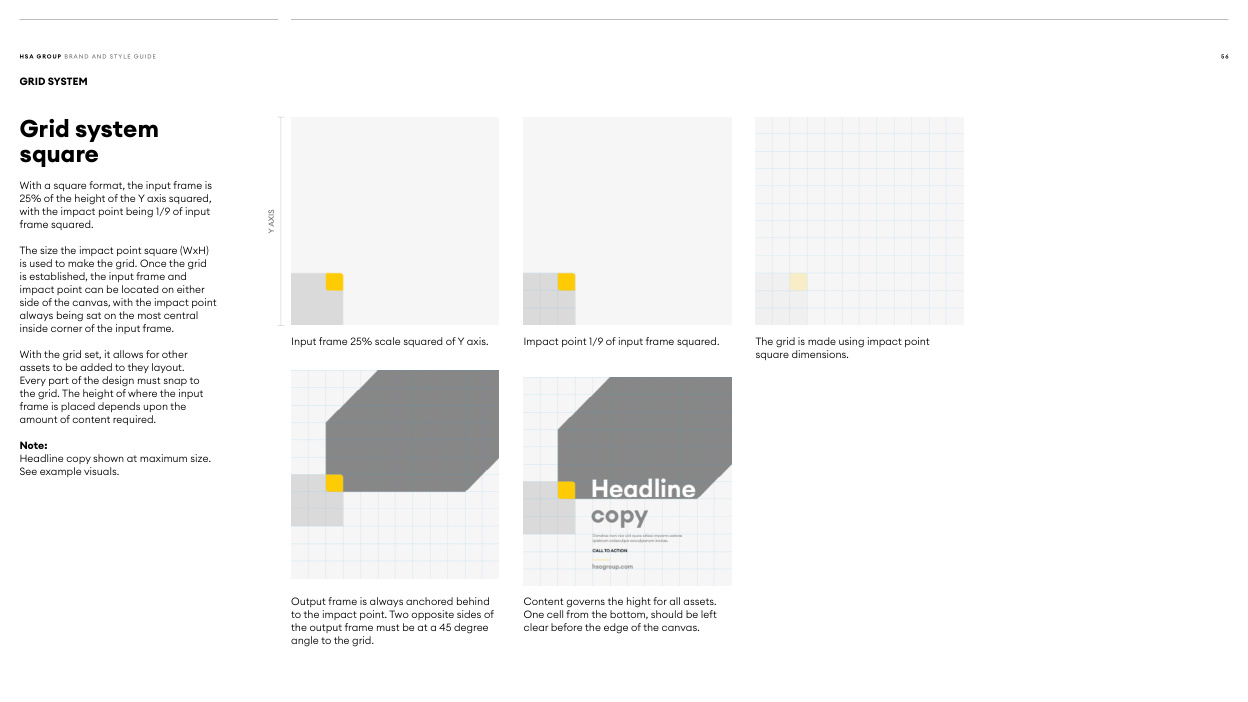
Read page text
H SA G RO U P B R A N D A N D ST Y L E G U I D E                                                                                                                                                                                                                                                                                                                                   5 6

GRID SYSTEM

Grid system
square

With a square format, the input frame is
25% of the height of the Y axis squared,
with the impact point being 1/9 of input
                                                                                                    AXISframe squared.
                         Y

The size the impact point square (WxH)
is used to make the grid. Once the grid
is established, the input frame and
impact point can be located on either
side of the canvas, with the impact point
always being sat on the most central
inside corner of the input frame.
                                                      Input frame 25% scale squared of Y axis.      Impact point 1/9 of input frame squared.      The grid is made using impact point
With the grid set, it allows for other                                                                                                      square dimensions.
assets to be added to they layout.
Every part of the design must snap to
the grid. The height of where the input
frame is placed depends upon the
amount of content required.

Note:
Headline copy shown at maximum size.
See example visuals.


                                               Output frame is always anchored behind      Content governs the hight for all assets.
                                                      to the impact point. Two opposite sides of    One cell from the bottom, should be left
                                                   the output frame must be at a 45 degree       clear before the edge of the canvas.
                                                 angle to the grid.